Made by a bar manager, for bar managers

Stocktake app for UK pubs and bars

Count your stock out loud.

Say “house vodka, six” and it lands on the count sheet. No clipboard, no pen, no typing it all up after close.

  • 30 days of Team free
  • No card needed
  • Priced in pounds for UK venues

Spending more than 1h a month counting stock?

Count stock 5–10 times faster with StockedUp’s voice-powered inventory. Saving just a few hours of staff time each month will cover your subscription fees. Every hour you save beyond that is money in your account.

Calculate your savings
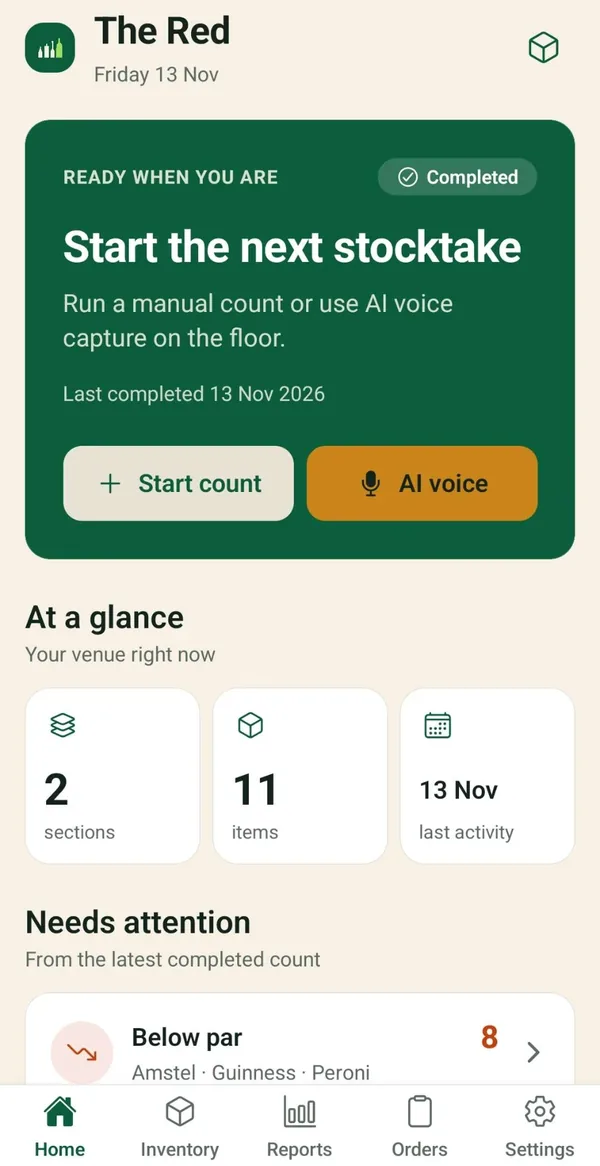
The StockedUp app home screen for a venue called The Red. A green card reads Start the next stocktake, with two buttons: Start count and AI voice. Below, At a glance shows 2 sections, 11 items and last activity on 13 November. Needs attention shows 8 items below par, including Amstel, Guinness and Peroni.

Try it now, no signup

See it work. Say a count.

A cut-down copy of the StockedUp count screen, running in this page. Eight bar items, three sections. Say one with a number and watch it land on the sheet.

  1. Pick a section

    Back bar, cellar or fridges. Each has its own count sheet, the way you walk the venue.

  2. Tap Start counting

    Your browser asks to use the microphone. No mic, or a browser that can’t listen? Tap an example instead.

  3. Say the item and the number

    “House vodka, six.” “Gin, point five.” “Two and a half lager kegs.” Got it wrong? Tap Undo.

Voice count
AI countDemo

This browser can’t listen. Tap an example or type one. It works the same way.

Say an item and a number.

Back bar2 lines

  • House vodka6
  • House gin0.5

The live demo needs JavaScript. With it on, you can speak or tap a count and watch it land on the sheet.

No mic? Tap one and we’ll “say” it for you:

Items in this demo: House vodka, House gin, Spiced rum, Prosecco, Lager keg, Tonic water, Lemons, Pint glasses.

The demo uses your browser’s own speech recognition (in Chrome, that means Google processes the audio). StockedUp does not record or store anything from it, and nothing is sent to any StockedUp server.

Product

Built for the stock room. Not the office.

A real screen from the app first, then StockedUp’s own screens, simplified. Count, check, order, and share the work.

01 · Voice or keypad

Pick a section. Then talk or tap.

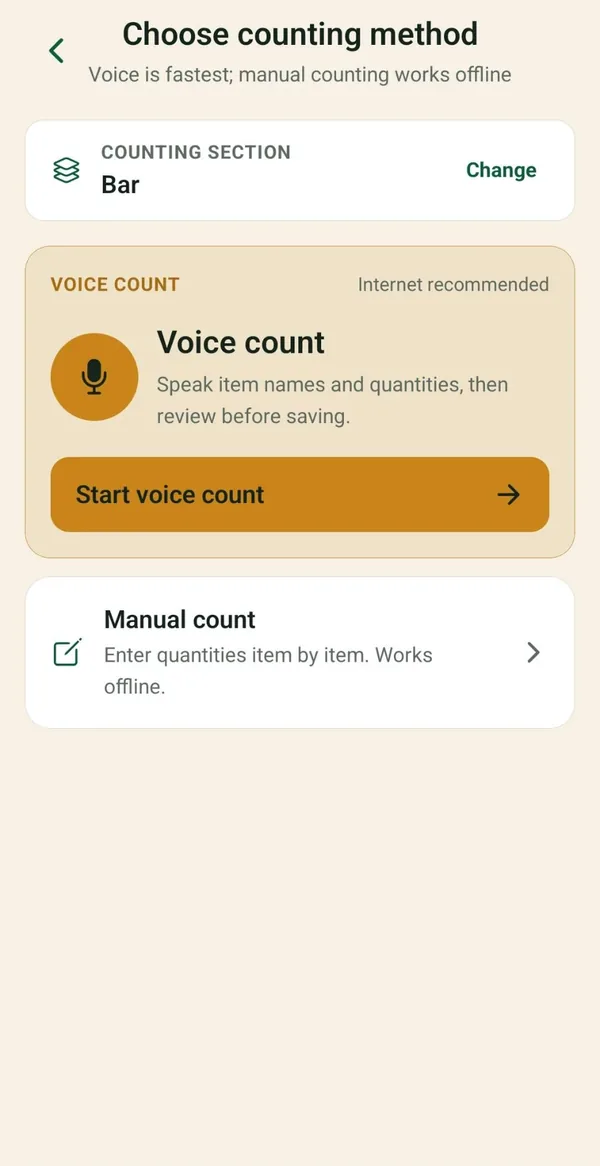
Start a count and choose how to do it. Voice is the fastest way through a shelf. Counting by hand works with no signal at all.

  • Voice count: say item names and quantities, then review before saving.
  • Manual count: enter quantities item by item.
  • Both count into the same sections and items.
The Choose counting method screen in the StockedUp app, for the Bar section. It reads: voice is fastest; manual counting works offline. A Voice count card with a microphone says speak item names and quantities, then review before saving, above a Start voice count button. Below it, Manual count says enter quantities item by item, works offline.

02 · Voice count

Say a whole shelf. Then check it.

Walk the section and say each item with its count. StockedUp matches what you said to the items you stock and shows you the list before anything is saved.

  • Change any number, or remove a line.
  • Match a new name to an item you already stock.
  • Anything it didn’t recognise is flagged, not guessed.

03 · Final review

Big swings get flagged. Before you finish.

When you finish, StockedUp compares each count with the last stocktake. Anything that has moved by 30% or more is flagged for a second look.

  • See the current count, the previous count and the change.
  • Tap Looks right, or Edit value to fix it.
  • The stocktake won’t complete until every flag is checked.

04 · Suggested orders

Set your par levels. Get the order list.

Give each item a par level. After a stocktake, StockedUp works out how many you need to get back to par.

  • Only items below par make the list.
  • Grouped by supplier, or by category if there’s no supplier.
  • Each line shows the count, the par and the section.

05 · Team

Bring the team in. No shared login.

Invite staff by email from the app. Everyone counts under their own login.

  • Core includes 2 logins. Team includes 5.
  • Invite people as a manager or bar manager.
  • Owners and managers can invite people and remove access.

Peace of mind

Mistakes get caught. Before they’re saved.

  • Nothing saves unchecked

    A voice count opens a review screen first. You save it when it looks right.

  • Every line can be fixed

    Nudge a count, type a new one or remove the line. Flagged items have Edit value.

  • No signal in the cellar

    Counts are kept on the phone and sync when you’re back in signal. A voice count that can’t be read there waits on the phone until you can check it.

  • The keypad is always there

    Mic blocked, or a noisy bar? Count by hand on the same sections and items.

Pricing

One price per venue. Voice included.

Core

£29 a month

or £290 a year · 2 logins

Team

£49 a month

or £490 a year · 5 logins

A new venue gets 30 days of Team. No card. It doesn’t turn into a paid plan unless you choose one.

See full pricing

Savings

Less time counting. More back in the till.

Put in your own numbers. This works out what the counting time you get back is worth, after paying for the plan.

Choose a plan

Estimated saving after the subscription

£58 a month

£692 a year

6.7 staff hours freed up a month

Example assumes an hour of counting by hand takes about 10 minutes with StockedUp. Your results will vary.

FAQ

Questions from the bar. Straight answers.

How much does StockedUp cost?

Prices are per venue, in pounds. Core is £29 a month or £290 a year, with 2 logins. Team is £49 a month or £490 a year, with 5 logins. Voice counting is included on both.

How does the free trial work?

A new venue gets 30 days of Team. No card is needed, and the trial does not turn into a paid plan unless you choose one. Email support@statisticaledge.co.uk to start.

What do my staff count on?

Their own phone. StockedUp is an Android app, and each person signs in with their own login. If your team uses iPhones, email us before you start.

Does it work in a cellar with no signal?

Yes. Counts are kept on the phone and sync when you have signal again. If a voice count can’t be turned into numbers there and then, the recording waits on the phone and you check it once you have signal. The stocktake can’t be finished while one is still waiting. On Android you can also download offline speech.

What if voice gets a count wrong?

You fix it before it’s saved. Every voice count opens a review screen first. You can change any number, remove a line, or match a new name to an item you already stock. Anything StockedUp didn’t recognise is flagged. You can also count by keypad at any time.

What happens to our data and voice recordings?

Voice is only used when you tap to record. With signal, the recording goes to our server and is transcribed by OpenAI. With no signal, and on a phone that can transcribe on the device, the audio stays on the phone. You can delete your account in the app. The privacy policy has the full detail.

Where do I pay, and can I cancel?

Paid plans are bought on this website through Stripe, not in the app. If you cancel, you keep access until the end of the period you have paid for, and the next payment is not taken.


Count your stock out loud.

30 days of Team, free. No card needed. It doesn’t become a paid plan unless you choose one.